A computer’s hardware is conventionally divided into five functional units: input, memory, arithmetic and logic, output, and control. They communicate through an interconnection network that ferries data and addresses between them.
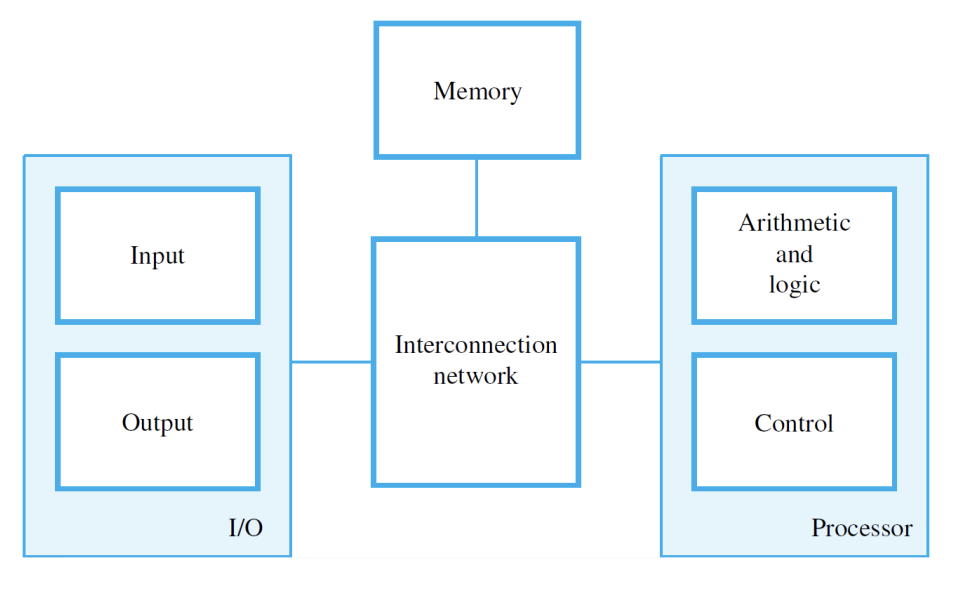
The five units cluster into three groups:
- Processor = arithmetic-and-logic + control.
- I/O subsystem = input + output.
- Memory stands on its own.
Information travels around as either instructions or data. Instructions (“machine instructions”) tell the processor what operations to perform and what to transfer; data is the operand bits the instructions act on. Both live in the same memory and are encoded the same way, as binary bit patterns. Numbers usually use positional binary notation, characters use binary codes (ASCII or Unicode).
A program is a list of instructions stored in memory. The processor fetches them one after another and executes them. Once loaded, the program runs autonomously except for external interruptions from I/O devices or operators.
Input unit
Accepts coded information from the outside world and converts it into binary for the processor. The most common input device is a keyboard: a key press becomes a binary code that’s sent to the processor as a single byte. Other input devices: mice, touchpads, microphones (with sampling), cameras, and network connections.
Memory unit
Stores both programs and the data they operate on. Has two main classes:
- Primary memory (main memory) — fast electronic RAM, where executing programs live. Made of semiconductor cells grouped into fixed-size words (16, 32, or 64 bits typically). Each word location has a unique address. Access time is independent of which location you ask for (“random access”).
- Secondary storage — magnetic disks, SSDs, optical media, flash. Slower and cheaper per bit, but non-volatile (data survives power-off).
The whole organization forms a Memory hierarchy, with cache sitting between the processor and main memory to bridge the speed gap.
Arithmetic and logic unit
The ALU does the actual computing. It takes operands from registers, performs an arithmetic or logical operation (add, subtract, AND, OR, compare, shift), and puts the result in another register. Memory is not directly operated on. Operands have to come into the processor first via Load instructions, then results go back out via Store.
Operands sit in registers during processing. Registers are the highest-tier storage on the chip; even faster than the on-chip cache.
Output unit
The reverse of the input unit: takes processed results and presents them externally. Printers, displays, audio, network out. Many devices like graphic displays and touchscreens act as both input and output, so they’re often grouped together as the I/O unit.
Control unit
Coordinates everything else. Issues control signals, monitors status, sequences instructions. The control unit sets the timing for every operation — when memory reads happen, when the ALU operates, when results write back.
In practice the control unit isn’t a single physical chunk. Its circuitry is distributed across the chip, with control lines running through every other functional unit. The block-diagram box exists for explanation, not as a thing you could point to on a die photo.
The overall flow:
- Programs and data come in through the input unit, get stored in memory.
- Instructions are fetched from memory into the processor and decoded.
- Operands are loaded into registers; the ALU operates on them.
- Results go back to memory or out through the output unit.
- The control unit directs the entire sequence.
How the processor handles each step: Memory Read and Write Operations and Instruction execution cycle.